


Kalak | كَلَك
3.521.00 Reviews
App Specs
- Version
- 1.15.2
- Updated On
- License
- Free
- Downloads
- 100,000+
- Developer
- Sadu Labs
- Categories
- Trivia
- Platform
- Android
Screenshots

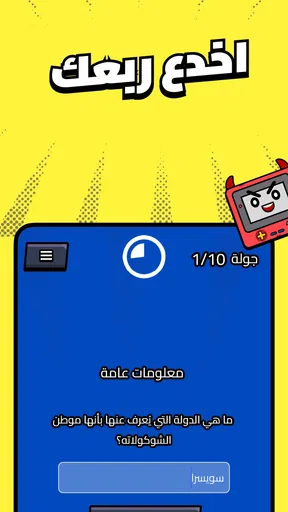
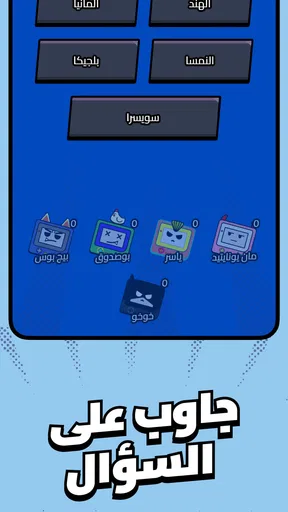


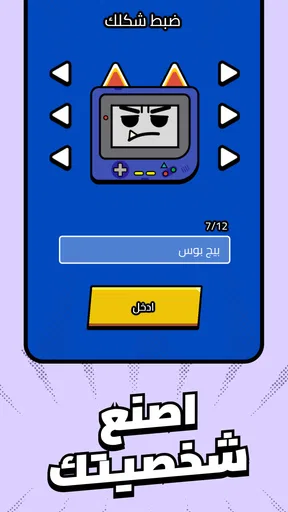
 Analysis by AppCompare
I approached Kalak | كَلَك expecting a quick trivia game, and that is the lens through which I think it is most useful to judge it: as something to dip into when I want a small mental challenge, not as a sprawling game that demands a long session. It sits in the trivia category, is free to install, and is developed by Sadu Labs. That makes it easy to try, though optional purchases mean “free” does not necessarily describe every possible in-game purchase.
A quick way to test your general knowledge
The best fit for a trivia game is often a short break with a clear beginning and end. I can imagine opening Kalak while waiting for a friend, during a quiet part of a commute, or when a conversation has drifted into a friendly “who knows this?” challenge. In those moments, a question-based game can be more engaging than scrolling through a social feed, because it gives me something specific to think about and respond to.
It also suits people who enjoy checking what they know without treating every wrong answer as a serious setback. Trivia is more fun when curiosity matters as much as getting the answer right. If a question makes me pause and reconsider an assumption, that is a small win even when I do not know the answer immediately.
For a group, the simplest way to use a game like this is to take turns reading a prompt and committing to an answer before anyone looks for clues. That keeps the interaction social instead of turning the phone into a private screen. It is a practical option for a short wait or a relaxed evening, although it is not a substitute for a dedicated party game if you need built-in team rules or a structured group format.
How it compares with other trivia choices
Compared with a conventional quiz app built around a single subject, a general trivia game is usually the more flexible choice when I do not know what mood I will be in. A specialist quiz is better when I want to practise a particular topic; a broad trivia session is better when I want variety and the possibility of being surprised by what comes up.
It is also different from trivia played through a search engine or a collection of question cards. Those alternatives can make it easier to choose a topic or share questions with a group, but they often require more setup. A mobile game is appealing when I want the phone to handle the basic activity and let me get started without planning a whole quiz night. On the other hand, people who prefer face-to-face play, custom questions, or a predictable subject may be happier with cards or a focused quiz app.
One useful habit is to treat each session as a small sample rather than a complete measure of what I know. A handful of questions can reflect the topics that happen to appear, not the full range of a person’s knowledge. I would use a run of play to spark discussion or identify subjects I want to learn about, not as a serious test of expertise.
Worth Reading Before You Choose

Flipboard Shows What News Apps Must Do Beyond the Feed

Switching to Android Auto Means Rethinking Your Driving Routine

Google Calendar Makes a Crowded Week Easier to Manage

Ludo King Makes the Most of the Minutes Between Plans

Baby Panda World Brings Quick Play to Modern Phones, but Its Game Library Feels Busy

ESPN’s Live Game View Makes Following Close Games Easier
Who is likely to enjoy it—and who may not
I would point casual players toward Kalak if they like quizzes, want an accessible activity to fill a few spare minutes, or enjoy comparing answers with friends. It may also suit someone who wants a low-commitment game to try before deciding whether trivia is a regular part of their phone routine. The game is rated for Everyone, so its stated audience is broad, though individual preferences still matter.
I would be more cautious about recommending it to someone looking for deep instruction, a structured course, or detailed explanations that build knowledge step by step. A trivia game can prompt learning, but answering questions is not the same as studying a subject. If my main goal were to master a language, prepare for an exam, or follow a carefully sequenced curriculum, I would choose a purpose-built learning tool instead.
It may also be a poor match for anyone who dislikes uncertainty in the questions they encounter or expects every session to focus on a chosen theme. Before settling into a routine, I would try a few short sessions and see whether the style of play holds my attention. The average rating is 3.5 from around 400 ratings, which suggests a mixed reception rather than universal enthusiasm. That is a reason to keep expectations measured, not a verdict on whether an individual player will enjoy it.
Exploring the World of Kalak
First off, let me tell you a bit about what Kalak is all about. This app is your gateway to a vibrant community of artists and art enthusiasts. It’s designed to bring people together through the universal language of art, and it does so with a unique flair.
The app’s interface is sleek and user-friendly. From the moment you open it, you’re greeted with a visually appealing layout that makes navigating through different sections a breeze. It’s clear that a lot of thought has gone into the design, ensuring that even newbies can find their way around without any hassle.
Features That Stand Out
One of the first things that caught my attention was the variety of features packed into this app. Whether you’re an artist looking to showcase your work or a casual user wanting to explore, there’s something for everyone.
For creators, it offers a platform to upload and share your art effortlessly. The process is straightforward, allowing you to focus more on your creativity rather than getting bogged down by technicalities. Plus, the app supports various art forms, from digital illustrations to traditional paintings, making it a versatile tool for any artist.
On the flip side, if you’re here to explore, the discovery section is a real treat. It’s like diving into an endless gallery of diverse artworks from all over the world. The app’s algorithm does a fantastic job of curating content that suits your taste, so you’re always finding something that resonates with you.
Community and Interaction
Another major highlight is its community aspect. The app fosters a sense of belonging among users, encouraging interactions and collaborations. You can comment on artworks, share your thoughts, and even connect with artists directly. It’s refreshing to see such a supportive environment where feedback is constructive and encouraging.
Moreover, the app frequently hosts challenges and events that get the community buzzing with excitement. Participating in these not only boosts your visibility but also helps in honing your skills by pushing your creative boundaries.
Personal Experience and Final Thoughts
Personally, I found myself spending more time on it than I initially expected. There’s something utterly captivating about scrolling through the endless stream of creativity and talent. The app does a commendable job of bringing art closer to people, making it accessible and enjoyable.
If I had to sum up my experience, I’d say that it’s a breath of fresh air in the art app landscape. It’s not just an app; it’s a community, a gallery, and a creative outlet all rolled into one. Whether you’re an artist or an art lover, this app is definitely worth checking out. So go ahead, download it, and dive into the vibrant world of art that awaits you!
Version context and what to expect as a returning player
The current release is version 1.15.2, while the game first appeared on November 3, 2024. Those details give returning players a practical reference point when checking whether their installed copy is current. They do not, by themselves, tell me what changed between releases, so I would not assume that a particular feature, question set, or interface change arrived in this version.
For someone already playing, the sensible approach is to judge an update by what actually changes on their device: whether the game opens reliably, whether familiar parts of the experience remain comfortable, and whether any new material gives them a reason to return. If an update alters the feel of a session, it is worth giving it a little time before deciding whether the difference improves the game. I would avoid expecting a major redesign simply because the version number has advanced.
New players can use the same version information as a basic compatibility check. The listed minimum is Android 6.0, so an Android device needs to meet that requirement to install the game. The age rating is Everyone, making it broadly suitable by its stated rating, but that does not mean every family will have the same preferences about screen time or optional purchases.
Free to start, with spending worth keeping in mind
There is no upfront price to try the game, which lowers the barrier for anyone who is curious but unsure whether trivia will hold their attention. In-app purchases range from $0.99 to $229.99 per item. That is a wide range, so I would check the purchase screen carefully before confirming anything, especially if a child uses the device or payment details are already saved.
My practical advice is to begin with the free experience and decide whether the core activity is enjoyable before considering a purchase. A paid item is only worthwhile if it addresses something I personally want from the game; the mere presence of optional purchases does not make them necessary. For shared devices, parental purchase controls can help prevent an accidental tap from becoming an unwanted charge.
The game has reached more than 100,000 installs, so it has found an audience, but that figure should not be confused with a guarantee that it will fit every player. The more useful test is whether the questions, pace, and general presentation suit the way you like to play. I would give it a short trial during an ordinary break rather than making a decision based on popularity alone.
Small habits that make a session more satisfying
A good way to avoid turning trivia into mindless tapping is to pause briefly before answering and say the answer aloud, even when playing alone. That simple habit makes each question feel more deliberate and makes it easier to remember the result afterward. When playing with someone else, agreeing that each person must answer before the reveal keeps the challenge fair without needing elaborate rules.
If a question feels unfamiliar, I would make a note of the topic and look it up after the session rather than interrupting every round. That keeps play moving while turning curiosity into a useful follow-up. It is a trade-off: stopping to research immediately may deepen one answer, but it can break the rhythm and make a quick game feel like homework.
Likewise, a short session is often better than stretching play after interest has faded. Trivia works well as a small burst of attention, and taking a break when the questions stop being enjoyable is more sensible than chasing a score or forcing another round. This is especially helpful when using it as a casual social activity: the phone should support the conversation, not take it over.
My recommendation after weighing the fit
Kalak is an easy game to consider if what you want is accessible trivia without an upfront purchase, and its broad age rating makes it a reasonable option for a wide audience. I would approach it as a casual diversion first, then decide whether its particular style earns a place in my regular rotation. The developer, Sadu Labs, has a game with a sizeable install base, but the mixed average rating is a reminder that the experience will not click for everyone.
For a player who wants a focused learning plan, a particular subject, or a more organised group quiz, another kind of app or an offline activity may be a better fit. For someone who simply wants a few questions to think through during a spare moment, this is a sensible one to try. My recommendation is modest but positive: start without spending, pay attention to how the sessions feel, and keep it only if the questions make your breaks more enjoyable.
Pros
- Intuitive user interface
- easy to navigate.
- Wide range of customizable features.
- Supports multiple languages.
- Regular updates with new content.
- Seamless integration with other apps.
Cons
- Occasional bugs that need fixing.
- Requires a stable internet connection.
- Some features are behind a paywall.
- Notifications can be overwhelming.
- Initial setup can be time-consuming.
FAQs for Kalak | كَلَك
What is Kalak and what can I do with it?
Kalak is a versatile app designed to enhance your creative expression. It allows users to create and share artistic content, including photos, videos, and digital art. With a variety of tools and features, Kalak enables you to unleash your creativity and connect with a community of like-minded individuals.
Is Kalak free to download and use?
Kalak is available as a free download on both Android and iOS platforms. While the app offers many features at no cost, there are optional in-app purchases and subscription plans that unlock additional tools and content for users who wish to expand their creative capabilities.
Can I use Kalak offline, or do I need an internet connection?
Kalak offers limited functionality offline, allowing you to work on your projects without an internet connection. However, to access the full range of features, including sharing your creations and exploring community content, an internet connection is required.
What types of content can I create with Kalak?
With Kalak, you can create a wide range of content, including photos, videos, and digital artworks. The app provides various editing tools, filters, and effects to enhance your creations. Whether you're a beginner or an experienced artist, Kalak offers something for everyone to express their creativity.
How does Kalak ensure the privacy and security of user data?
Kalak is committed to protecting user privacy and data security. The app employs industry-standard encryption and privacy measures to safeguard user information. Additionally, users have control over their content visibility and can manage who accesses their creations, ensuring a safe and secure creative environment.


